System Requirements
Supported Processors
Intel & AMD
Supported Graphics Cards
Nvidia, AMD & Intel UHD
Supported OS
Windows 10 & 11 (all builds)
Supported BIOS Mode
UEFI & Legacy
Supported Game Client
Roblox Launcher
Project Type
Internal
Included Spoofer
No
Stream Bypass
Yes
⚠️ No BIOS setup required.
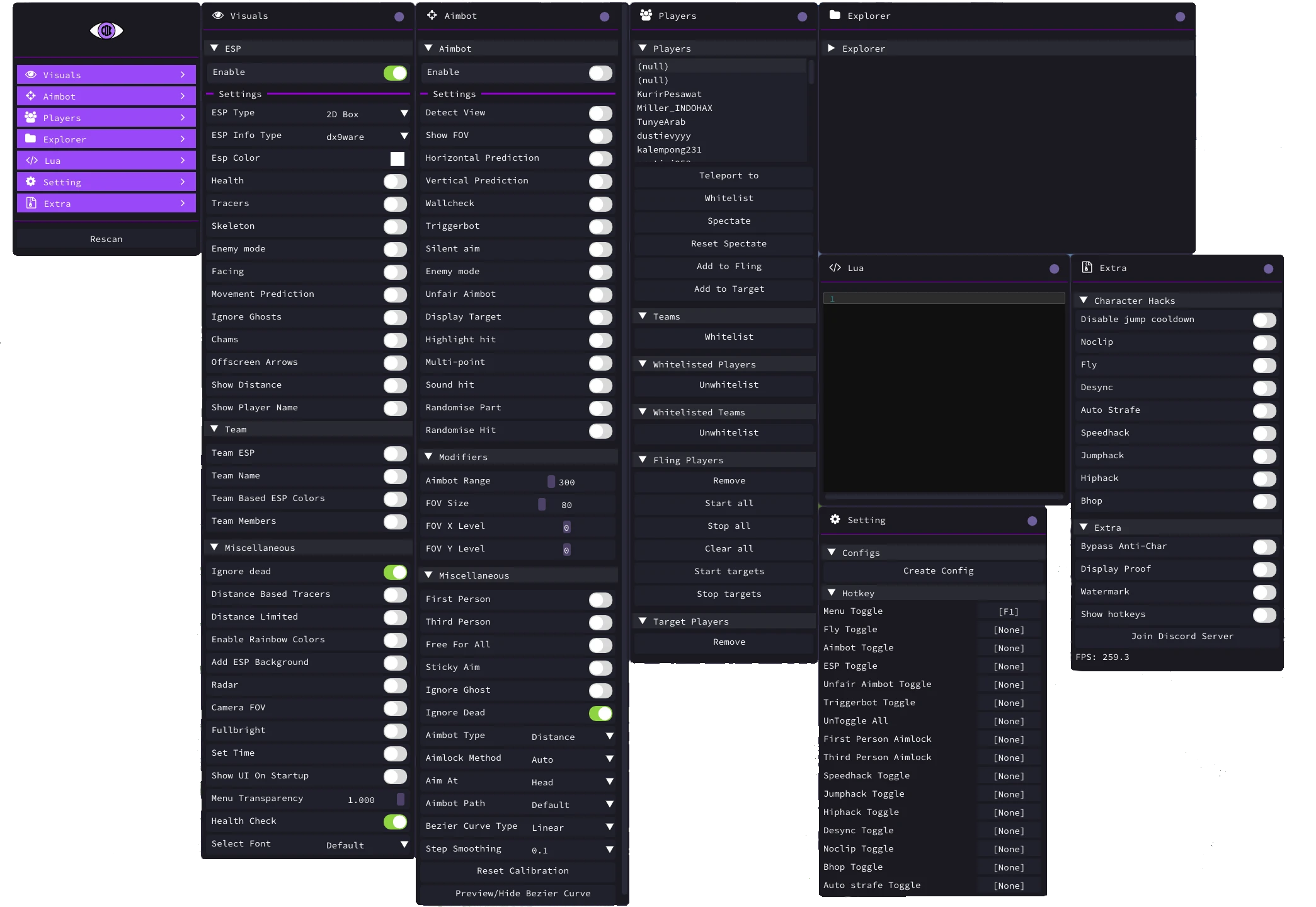
👁️ Player ESP
ESP Type (2D Box)
ESP Info Type (dx9ware)
ESP Color
Health ESP
Tracers
Skeleton ESP
Enemy Mode
Facing ESP
Movement Prediction
Ignore Ghosts
Offscreen Arrows
Distance ESP
Player Name ESP
Team ESP
Team Name
Team-Based ESP Colors
Team Members
Ignore Dead
Distance-Based Tracers
Distance Limit
Rainbow Colors
ESP Background
Health Check
🟣 Chams
Chams
📡 Radar
Radar
🎯 Aimbot
Detect View
FOV Display
Horizontal Prediction
Vertical Prediction
Wall Check
Silent Aim
Enemy Mode
Unfair Aimbot
Display Target
Hit Highlight
Multi-Point
Hit Sound
Randomize Part
Randomize Hit
Aimbot Range (300)
FOV Size (80)
FOV Position (X Level: 0, Y Level: 0)
First Person Aimlock
Third Person Aimlock
Free For All
Sticky Aim
Ignore Ghosts
Ignore Dead
Aimbot Type (Distance)
Aimlock Method (Auto)
Aim Bone (Head)
Aimbot Path (Default)
Bezier Curve Type (Linear)
Step Smoothing (0.1)
Reset Calibration
Bezier Curve Preview
⚡ Triggerbot
Triggerbot
👤 Player
Teleport To Player
Whitelist Player
Spectate Player
Reset Spectate
Add Player to Fling
Add Player to Target
Team Whitelist
Unwhitelist Player
Unwhitelist Team
Fling Players (Remove, Start All, Stop All, Clear All, Start Targets, Stop Targets)
Target Players (Remove)
📷 Camera
Camera FOV
First Person
Third Person
🏞️ Visual (World)
Fullbright
Set Time
👤 Character
Disable Jump Cooldown
Noclip
Fly
Desync
Auto Strafe
Speedhack
Jumphack
Hiphack
Bhop
🔧 Utilities / Others
Bypass Anti-Char
Display Proof
Watermark
Show Hotkeys
Lua Editor
⚙️ Settings
Show UI on Startup
Menu Transparency (1.000)
Font Selection (Default)
Create Config
Menu Toggle (F1)
Fly Toggle
Aimbot Toggle
ESP Toggle
Unfair Aimbot Toggle
Triggerbot Toggle
Untoggle All
First Person Aimlock Hotkey
Third Person Aimlock Hotkey
Speedhack Toggle
Jumphack Toggle
Hiphack Toggle
Desync Toggle
Noclip Toggle
Bhop Toggle
Auto Strafe Toggle
* The functionality of the program can be changed at any time at the discretion of the developer. We strive to reflect the latest available features.
A powerful and reliable Roblox product developed by DX9Ware Projects.
DOFF
01 Nov 2026
Verified Purchase
Automatic feedback after 7 days
reza
18 Oct 2026
Verified Purchase
Automatic feedback after 7 days
wiradinata brahma
08 Oct 2026
Verified Purchase
Automatic feedback after 7 days
ser
12 Sep 2026
Verified Purchase
Automatic feedback after 7 days
Rayye
23 Aug 2026
Verified Purchase
Automatic feedback after 7 days
ROBLOX
DX9WARE : ROBLOX (EXTERNAL)
Undetected
Last updated:
—