Evicted : Multi AI (Aimbot)
A powerful and reliable Multi AI (Aimbot) product developed by Evicted Projects.
One subscription includes all (9 supported games):
- Rust
- PUBG
- Valorant
- CS2 (Include FaceIT)
- Rainbow Six Siege
- Apex Legends
- Warzone
- Fortnite
- Roblox
System Compatibility:
- Supported Processors: Intel & AMD
- Supported Graphics Cards: NVIDIA & AMD
- Supported OS: Windows Windows 10 & 11 x64 (all build)
- Supported BIOS Mode: UEFI & Legacy
⚠️ No BIOS setup required.
Additional information:
- Supported Window Mode: Borderless & Windowed
- Supported Stream Bypass: Yes
- Supported Game Launcher: Any Platform (Depending on the Game)
- Included Spoofer: -
- Software type: External
Feature List:
⚙️ Automatic Configuration
- Auto Configuration - Automatically applies suitable base settings for the selected game. The user can adjust every applied value afterward.
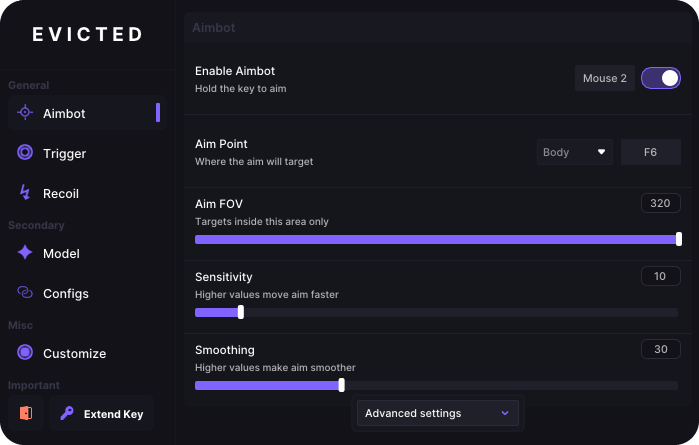
🎯 Aimbot
- Enable Aimbot - Enables automatic aiming while the assigned activation key is held.
- Advanced Settings - Opens additional controls for detailed aimbot customization.
- Aim FOV - Sets the area around the crosshair in which targets can be detected.
- Aim Point - Selects the target body area, such as the head or body.
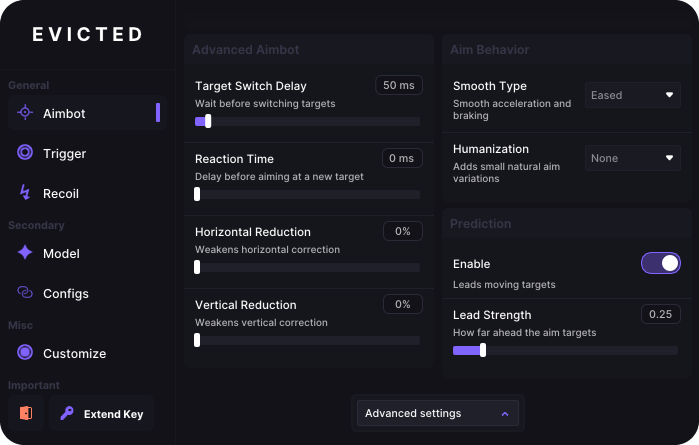
- Horizontal Reduction - Reduces the amount of horizontal aiming assistance.
- Vertical Reduction - Reduces the amount of vertical aiming assistance.
- Humanization - Adds natural variations so aiming movement looks less robotic.
- Lead Strength - Controls how far ahead of a moving target the system aims.
- Prediction - Predicts target movement and compensates the aiming position.
- Reaction Time - Adds a configurable delay before automatic aiming begins.
- Sensitivity - Controls how quickly the crosshair moves toward a target.
- Smoothing - Makes automatic aiming movement softer and more gradual.
- Smooth Type - Selects the acceleration and deceleration style used during aiming.
- Target Switch Delay - Adds a pause before switching to another target.
🤖 Model
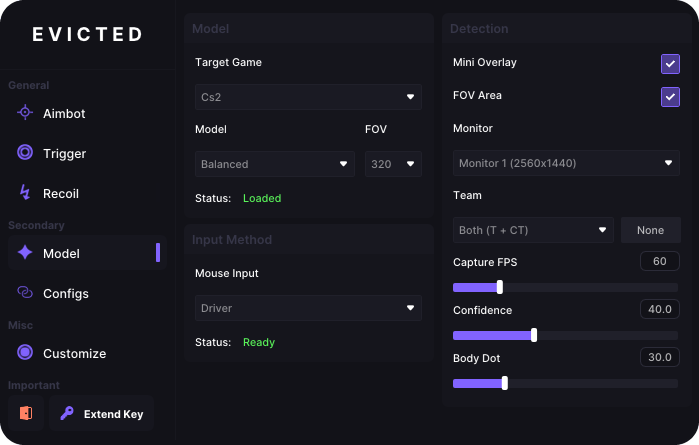
- Model - Selects an AI detection model focused on speed, accuracy or balance.
- Target Game - Selects the supported game for the active recognition profile.
- Team - Defines which teams or target groups the model should recognize.
- Monitor - Selects the display that will be captured and analyzed.
- Capture FPS - Controls how many screen frames are analyzed each second.
- Confidence - Sets the minimum detection confidence required to accept a target.
- FOV - Sets the size of the screen area scanned by the recognition model.
- FOV Area - Shows or hides the boundaries of the active detection area.
- Body Dot - Adjusts the body reference point used for recognition or aiming.
- Mouse Input - Selects the method used to send movement commands to the mouse.
- Mini Overlay - Shows or hides a compact overlay with essential information.
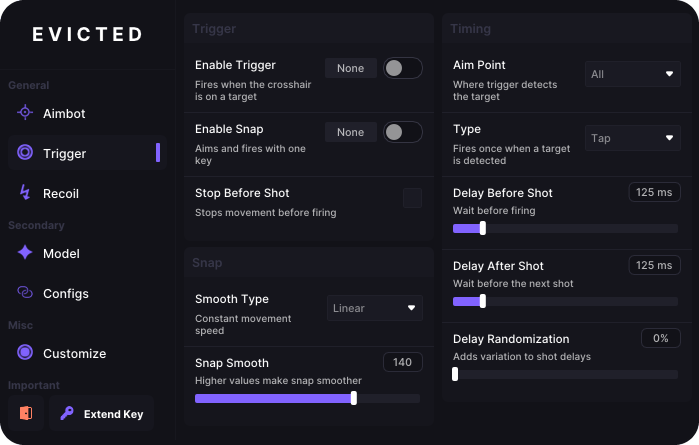
⚡ Triggerbot
- Enable Trigger - Automatically fires when a valid target reaches the crosshair.
- Enable Snap - Quickly moves the crosshair to a target before firing.
- Aim Point - Selects the body area that must be detected before firing.
- Delay Before Shot - Adds a configurable pause before the trigger fires.
- Delay After Shot - Sets the waiting time before another automatic shot.
- Delay Randomization - Varies firing delays to avoid identical timing patterns.
- Stop Before Shot - Stops character movement before firing to improve accuracy.
- Snap Smooth - Controls the speed and smoothness of snap aiming.
- Smooth Type - Selects how the crosshair accelerates during snap aiming.
- Type - Selects the operating mode used by the automatic firing system.
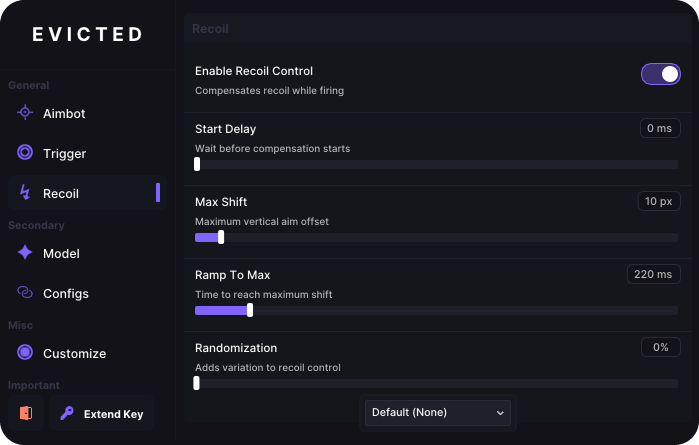
🔫 Recoil Control
- Enable Recoil Control - Compensates for vertical and horizontal weapon recoil.
- Max Shift - Limits the maximum crosshair movement used for compensation.
- Ramp To Max - Controls how quickly recoil compensation reaches full strength.
- Randomization - Adds small variations to recoil-control movement.
- Recoil Preset - Selects a saved recoil profile for a specific weapon.
- Start Delay - Sets the delay before recoil compensation begins.
💾 Config
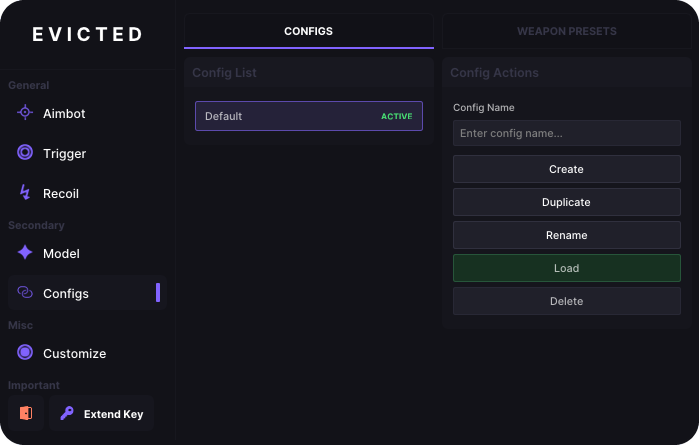
- Config List - Displays all saved configuration profiles.
- Config Name - Provides a field for naming a new configuration.
- Create Config - Creates a new configuration profile.
- Load Config - Applies all settings stored in the selected configuration.
- Rename Config - Changes the name of the selected configuration.
- Duplicate Config - Creates a copy of a configuration with all its settings.
- Delete Config - Permanently deletes the selected configuration.
🔫 Weapon Presets
- Activation Key - Assigns a key that activates the selected weapon preset.
- New Preset - Provides a field for naming a new weapon preset.
- Create Preset - Creates a new weapon-specific settings profile.
- Duplicate Preset - Copies the selected preset with all its settings.
- Delete Preset - Permanently deletes the selected weapon preset.
- CS2 Presets - Displays saved weapon presets created for CS2.
⚙️ Customization
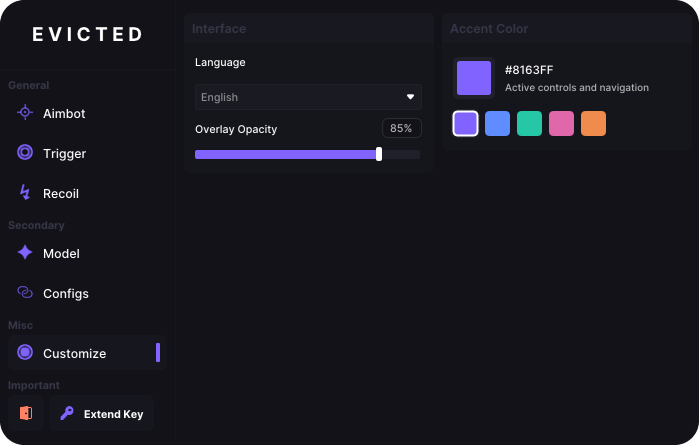
- Accent Color - Changes the color of active controls and navigation elements.
- Accent Color Presets - Provides ready-made interface color options.
- Custom Accent Color - Allows a custom interface color to be entered manually.
- Overlay Opacity - Controls how transparent or visible the overlay appears.
- Language - Changes the application interface language.
* The functionality of the program can be changed at any time at the discretion of the developer, but we always try to keep the information up to date
×
![Zoomed Product Image]()